I wrote previously about a seven-step system to surface load-bearing assumptions in order to catch misalignments earlier, and flip the concept of the last 20% of a task taking 80% of the time.
To demonstrate that this is not just theory, but a human-in-the-loop agentic workflow that is actually capable of producing production-quality code (when used in the right hands), I created a fictional task on a pre-MVP project I have been working on.
Before the agent wrote a single line of code for this task, the workflow surfaced four load-bearing issues: a scope conflict hidden in the mockups, three queries that would have silently gone stale, an AuthGuard that would have pushed users into signing up for duplicate accounts, and missing seed data the feature depends on. Each one was cheap to resolve as a review question, and each one would have been a rework cycle if I found it after implementation. We will get to those in detail below.
The foundation we will be building on is “GroceryHack,” a grocery list application that scrapes this week’s specials from your favorite grocery store flyers, matches the deals with your favorite meals, and assembles a grocery list to save you time and money.
The task we will be implementing is a feature enabling family members of the main account holder to make suggestions for swapping out a meal on the grocery list.
The full Gherkin spec can be found here, but I will give you the highlights:
The family member can:
- make suggestions
- view the status of the suggestions: pending / approved / rejected
The main account holder can:
- view the list of suggestions
- approve or reject suggestions
Below are some of the mockup examples:
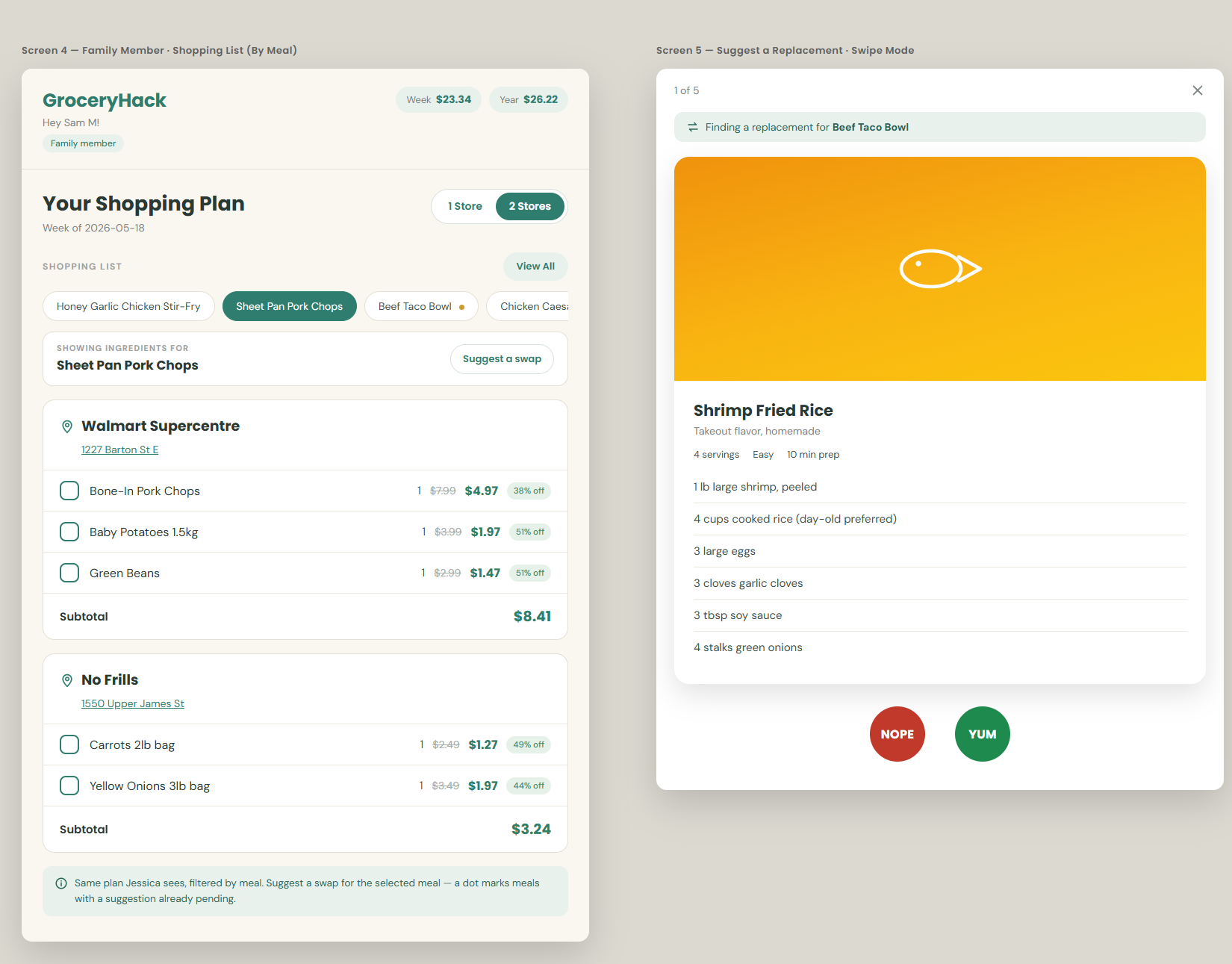
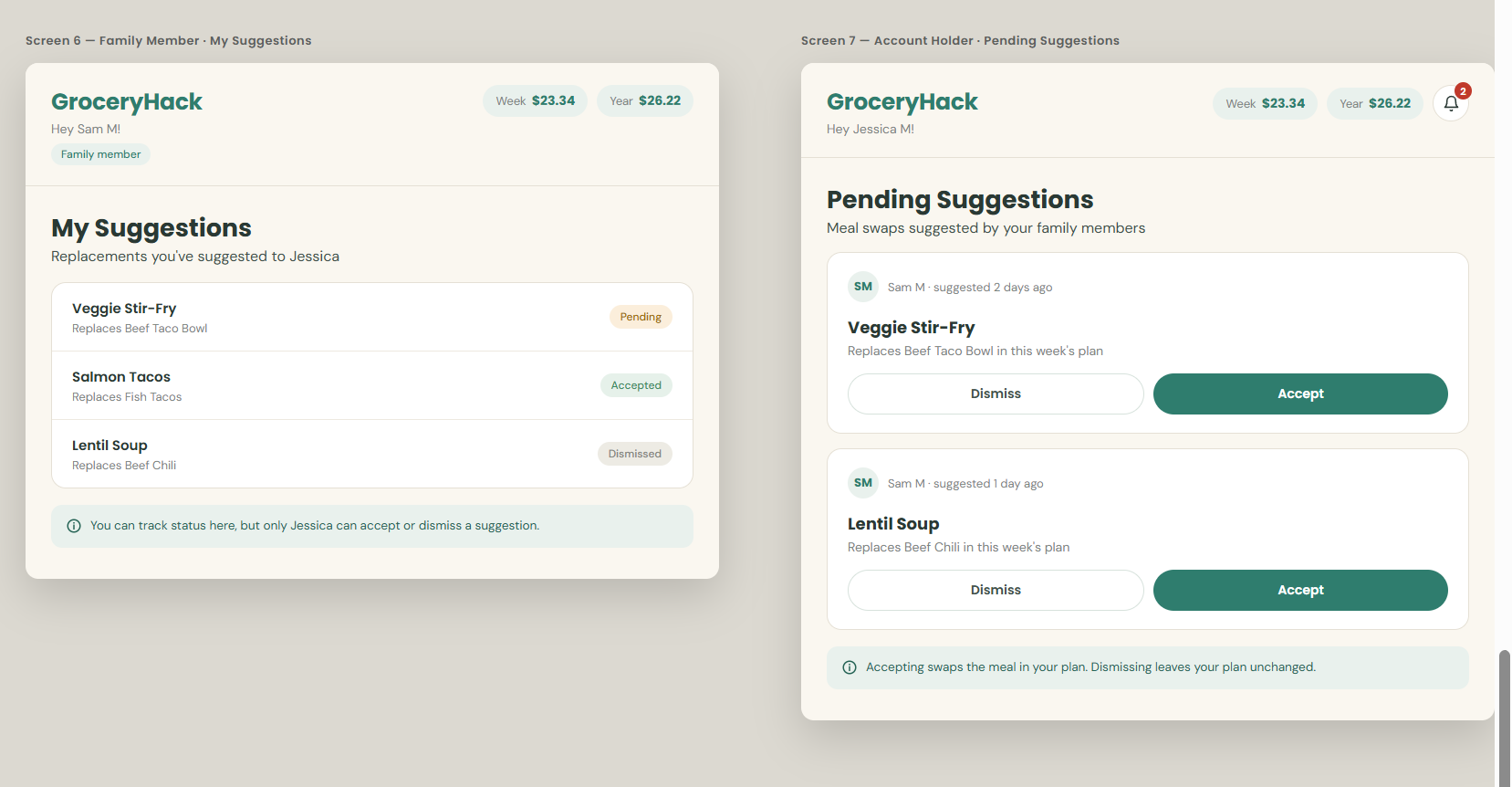
(The entire set of mockups is available here.)
The seven checks outlined in the first post are formalized into a series of slash commands, which we will use to implement these features:
- /slice-planner — Breaks the task into end-to-end slices that can be verified, and defines the scope of the current slice we will implement
- /slice-abstract — For each slice we surface load-bearing assumptions that would lead to a suboptimal solution if not corrected. Once approved by the human, these are documented
- /slice-implement — Only once the scope plan and the assumption abstract are created do we run an implementation command to implement the feature based on the context we created. This includes a comprehensive verification stage that validates the features were implemented correctly and iterates if errors are found
Let’s look at how slice 1 went:
/slice-planner
It identified a critical piece of the puzzle: the Gherkin spec refers to a “family member” account, however there is only one type of user currently in the application — the primary account holder.
It then identified a good plan for how to break up the slices:
- family member account type + scaffolding of the page the family member sees after logging in — this is the slice we implement in this post (see the complete slice.md plan)
- family member suggests a meal replacement
- one pending suggestion per meal + view existing
- account holder reviews pending suggestions
- account holder accepts → plan updated (the heavy deal-matching swap)
- account holder dismisses
- family member tracks suggestion status
- account holder direct edit + permission hardening (403s)
(Click here to see the slices.md.)
Each of the slices has a verifiable feature added, so the agent has done a good job.
/slice-abstract
The slash command works through a seven-step process to make decisions about the design, and surface any uncertainties to the human user. Here is a summary of each section’s findings:
1. User capability & journey
Here’s a snippet of its findings:
- New capability: A family member can sign in with their own credentials, navigate to
/family, and see the account holder’s current-week meal plan read-only with a visible “Family member” role label and an info banner explaining the relationship.- Getting there: User logs in at
/login(existing) → navigates manually to/family(post-login auto-routing to/familyis deferred to Slice 8).- Afterward: The user sees the plan but cannot act on it yet. “Suggest a swap” affordances arrive in Slice 2.
The agent has a great grasp of the capabilities of this first slice.
2. Entities
The agent correctly identifies the existing DB entities, Users and WeeklyPlans (the grocery list for this week), and the one-to-many relationship between them (one user will have many WeeklyPlans).
It correctly identifies that the Gherkin spec declares a new entity, the “family member” type user. This new user needs to view the weekly plan associated with the existing account holder, but has no weekly plan of its own.
It creates this DB design for visualization and documentation purposes:
users gains a nullable, self-referencing account_holder_id.I agree with the agent’s design, and believe the addition of account_holder_id is a good way to distinguish an account holder from a family member. If account_holder_id is NULL, then the user is an account holder. If account_holder_id is a UUID, then it has an FK on another User row, and we know they are a family member.
3. Contracts
The agent makes a decision that the existing endpoint GET /api/v1/landing will not be reused by the family member account. Instead a new endpoint, GET /api/v1/family/plan, will be used for the feature.
I reviewed this and decided this is fine. We are already adding a separate page for the family member user, and the existing front-end routes won’t be reused, so it’s fine to not reuse the same backend endpoints. If I did want to change this, this is where I would object and have the design altered to reflect my mental model.
4. Annotated mockup
The agent reviews the mockups and sorts the elements into what already exists and what is new. It determines which elements are within the scope of this slice, which are generic components (these happen to already exist, reused from the account holder landing page), and which are one-off components. It also makes suggestions on how state management should be handled: in this case a hook to fetch the data from the backend, mirroring the state management from the existing landing page.
In this case the mockups allow us to piggyback off the existing work, so the agent is able to accurately perform this task without human intervention.
5. Data flow
The agent creates this flow chart of how data flows from the DB table to the front end: the data lives in the weekly_plans table, the common util function getCurrentPlan queries it, the FamilyService calls that function, our new endpoint uses the service to build the response, and the useFamilyPlan() hook consumes the endpoint on the front end.
weekly_planstable · user_id = JessicaSELECT * FROM weekly_plans WHERE user_id = $holderIdgetCurrentPlan(holderId)db/queries/landing.ts:118FamilyServiceservices/family.ts · lookup caller → holder → plan{ holderName, savingsThisWeek, plan }GET /api/v1/family/planroutes/family.ts200 · snake_case JSONuseFamilyPlan()hooks/useFamilyPlan.tstransformKeys → camelCase · api.ts:14–31FamilyPlanPage.tsx/familyStoreMealDealListcomponents/StoreMealDealList.tsx/family page. Dashed pieces are new in this slice.The point of this step is simple: it proves the agent has traced the actual connections in the codebase, and not just guessed at how the pieces fit together. If the chain here didn’t match reality, this is where I would catch it, before any of it turned into code. So far the agent has connected all the right pieces.
6. Conflicts & load-bearing decisions
The agent worked through the checkpoints defined in /slice-abstract and surfaced four load-bearing issues that it flagged for human review:
- The first was a conflict between the mockup and the defined scope. Part of the task at hand was to scaffold a new page the family member account will use to view the existing list. The mockup included a feature that was outside this scope, and I confirmed the recommendation to leave it for a future slice. ✅
- The second identified three queries used in the API that touch an entity that will require a new field. The agent correctly assumed that the queries should be updated with the new field as well. ✅
- It identified that the existing AuthGuard wasn’t sufficient for the features required. The existing guard was a scaffolding relic, and simply encouraged the user to sign up. A new guard was needed that redirects to the login page, so the family member logs in rather than signing up as a new account. ✅
- The agent identified that we need seed data for the new family member account. The creation of the accounts is outside the scope of the Gherkin spec for this task, so we must create a seed file to populate the database. ✅
In this case the agent identified good areas for clarification, and even had good recommended solutions.
At this stage I review and approve the four surfaced questions, and I also review the checkpoints the agent identified.
7. Verification plan
A detailed verification plan is defined, including:
- Running the migration, with a compilation check after
- Seeding the data for the test users
- Testing the API’s happy path
- Testing a 403 — the account holder tries to call the family member’s endpoints
- Testing a 404 — when a user has no weekly_plan
- Using Chrome to log in as the new family member and view the
/familyroute - Verifying in Chrome that the new banner is present for the family member
- Verifying the meals are viewable in family mode
- Confirming no “suggest meal swap” button is present (this is out of scope for this slice)
- Screenshotting the page for UI verification
/slice-implement
This command runs mostly unassisted. With the correct tools authorized in the slash command, very little is required from the human while it is running. After the code creation, the claude-in-chrome MCP would normally be used by the agent to visually inspect and click through the features it created. Because I work on WSL, and because the claude-in-chrome MCP doesn’t work well on WSL, I created the cdp.py script to help Claude perform the same function it can normally do on Windows or Mac.
Once the command completes, I do a manual review of the features added. I can see that the new route exists, the appropriate components are reused, and the banner indicating we are in family member mode is visible.
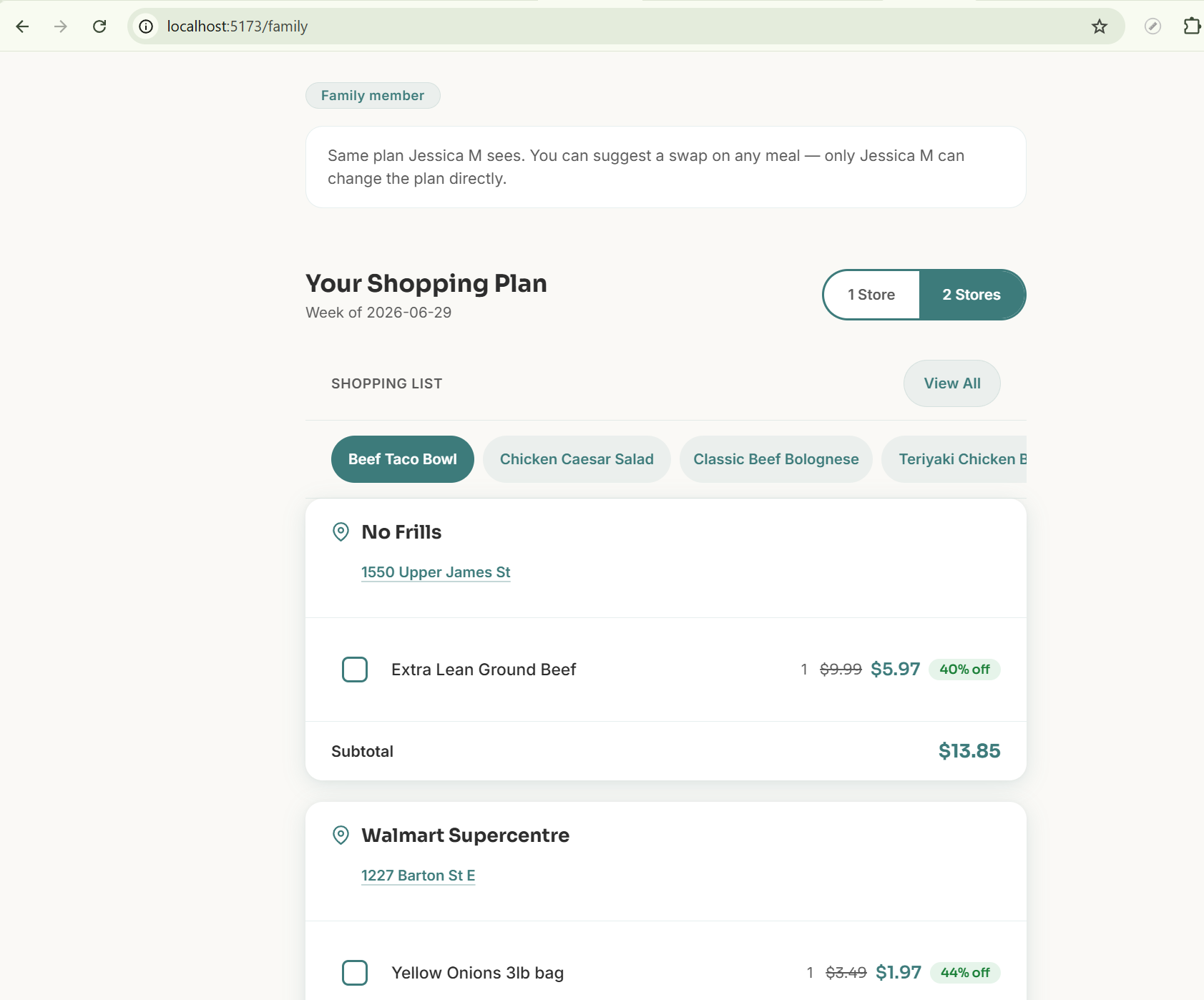
After a quick code review (the resulting commit can be seen here), we are good to proceed to slice #2.
The takeaway
What stands out to me about this slice is what didn’t happen. There was no back-and-forth vibe coding session at the end, no fixing silly errors, no discovering during manual testing that the agent had quietly misunderstood the spec. Once the slice plan and the assumption abstract were approved, the implementation ran fully autonomously, and it did it right the first time.
That is the trade this workflow makes. The human effort is front-loaded into reviewing the plan and the surfaced assumptions, where the decisions are still cheap to change. The four issues surfaced in step 6 were all easy to resolve as review questions. Any one of them would have been expensive as a bug. Take the AuthGuard: without that check, family members would have been pushed into signing up for duplicate accounts, and I would have been debugging a design decision through finished code. Instead the usual long tail at the end of the task just wasn’t there.
A note on “in the right hands”
I said this works in the right hands, and slice 1 shows what that actually means. My job here was not writing code, it was holding the mental model of the system. When the agent decided to add a new endpoint instead of reusing GET /api/v1/landing, I had to know the architecture well enough to judge whether that matched my intent (it did). If it hadn’t, that review step is exactly where I would have objected, before any implementation existed. The workflow surfaces the decisions, but you still have to be able to evaluate them.
Next up
Slice 1 gave us the family member account type and a read-only view of the plan. Slice 2 is the suggestion flow itself, including the one-pending-suggestion-per-meal constraint. That post hasn’t been written yet — coming soon.
All the slash command prompts (/slice-planner, /slice-abstract, /slice-implement) are linked, and the completed work for all 8 slices is on the family-member-meal-suggestions branch.
If you do end up trying these prompts on your own project, I’d love to hear where they break!